Introduction
If you're looking for an easy way to perform an imei huawei p8 lite check, you're in the right place. Whether you own the Huawei P8 Lite (2017) or you're planning to buy a used one, knowing how to find and verify the IMEI number is more important than many people realize.
In Pakistan, the IMEI is often the first thing buyers check before making a deal. It helps confirm whether a phone is genuine, eligible for PTA registration, or reported as lost or stolen. A quick IMEI check can save you from buying a blocked device or facing unexpected network issues later.
From experience, one common mistake people make is assuming every Huawei P8 Lite has the same model and IMEI details. That's not true. This phone was released under several different names, including Huawei Honor 8 Lite, Huawei Nova Lite, Huawei P9 Lite (2017), and Huawei GR3 (2017). Although they share similar hardware, the IMEI assigned to each device is unique and should always be verified before purchase.
Many Quora users who purchased second hand Huawei phones mentioned they skipped the IMEI check because the device looked brand new. Later, they discovered it had network restrictions or previous ownership issues. Spending just a minute checking the IMEI could have prevented those problems.
In this guide, you'll learn every practical method to locate your Huawei P8 Lite IMEI, understand why it matters, verify it correctly, and troubleshoot common IMEI related problems. We'll also discuss IMEI repair, unlocking, reset misconceptions, and answer the questions users search for most.
By the end of this article, you'll know exactly how to check your Huawei P8 Lite IMEI with confidence, whether you're using the phone daily or inspecting one before buying.
What Is the Huawei P8 Lite IMEI Number?
Every mobile phone has a unique identity, and for the Huawei P8 Lite, that identity is the IMEI. The imei huawei p8 lite is a 15 digit number assigned by the manufacturer to identify your device on mobile networks worldwide. Unlike your SIM card, the IMEI belongs to the phone itself and does not change when you switch carriers.
Whether you use the phone in Pakistan or another country, mobile operators rely on this number to recognize the device, verify its legitimacy, and help protect networks from stolen or unauthorized phones.
What Does IMEI Mean?
IMEI stands for International Mobile Equipment Identity. Think of it as your phone's digital fingerprint. No two genuine Huawei P8 Lite devices should have the same IMEI number.
You can usually find it by:
You can usually find it by:
Dialing *#06#
Opening the phone's Settings
Checking the retail box
Looking on the SIM tray (on some models)
If your Huawei P8 Lite supports Dual SIM, you'll normally see two IMEI numbers, one for each SIM slot.
Why Is the IMEI Important?
Many people only search for their IMEI when something goes wrong. In reality, it should be one of the first things you check after buying a phone.
The IMEI helps you:
The IMEI helps you:
Verify the phone is genuine.
Confirm PTA compatibility in Pakistan.
Check if the phone has been reported lost or stolen.
Match the phone with its original retail box.
Support warranty and service requests.
Identify the device if it's lost.
In many cases, sellers focus only on the phone's appearance. However, experienced buyers always compare the IMEI shown on the device with the one printed on the box. If they don't match, it's a warning sign worth investigating before completing the purchase.
Does Every Huawei P8 Lite Have the Same IMEI?
No. Every genuine Huawei P8 Lite is assigned its own unique IMEI during manufacturing.
This applies to all regional variants, including:
This applies to all regional variants, including:
Huawei P8 Lite (2017)
Huawei P9 Lite (2017)
Huawei Honor 8 Lite
Huawei Nova Lite
Huawei GR3 (2017)
Even if two phones have identical specifications, colors, and model numbers, their IMEI numbers will always be different.
Common Myths About Huawei P8 Lite IMEI
There are several misconceptions surrounding IMEI numbers. Here are the facts:
Myth | Reality |
|---|---|
All Huawei P8 Lite phones have the same IMEI. | Every device has its own unique IMEI. |
Factory resetting changes the IMEI. | A factory reset does not affect the IMEI. |
Changing the SIM card changes the IMEI. | The IMEI belongs to the phone, not the SIM card. |
A phone without an IMEI can still work normally. | Most mobile networks require a valid IMEI for proper connectivity. |
Understanding these basics makes the remaining steps in this guide much easier. Once you know what the IMEI represents, checking and verifying it becomes a simple but valuable habit.
Huawei P8 Lite (2017) Overview
Before performing an imei huawei p8 lite check, it's helpful to know exactly which Huawei P8 Lite model you own. Huawei released several phones with similar names, and many users confuse them when searching for IMEI information, software updates, or replacement parts.
The Huawei P8 Lite (2017) was introduced in January 2017 as a refreshed version of the original P8 Lite. It offered a premium glass-and-metal design, a Full HD display, improved cameras, and a reliable Kirin processor. Although Huawei has discontinued the device, it is still widely used in Pakistan, especially in the second-hand smartphone market.
One common mistake people make is assuming every "P8 Lite" is the same phone. In reality, Huawei sold this device under different names depending on the region. The good news is that regardless of the branding, each genuine device has its own unique IMEI that can be checked using the methods covered later in this guide.
Huawei P8 Lite (2017) Specifications
Feature | Details |
|---|---|
Release Date | January 2017 |
Status | Discontinued |
Display | 5.2-inch IPS LCD |
Resolution | 1080 × 1920 pixels (Full HD) |
Processor | HiSilicon Kirin 655 (16nm) |
CPU | Octa-core |
GPU | Mali-T830 MP2 |
RAM | 3GB / 4GB |
Storage | 16GB, 32GB, 64GB |
Expandable Storage | microSDXC |
Rear Camera | 12MP with LED Flash |
Front Camera | 8MP |
Video Recording | 1080p @ 30fps |
Battery | 3000mAh (Non-removable) |
Operating System | Android 7.0 Nougat, Upgradeable to Android 8.0 Oreo, EMUI 9 |
Fingerprint Sensor | Rear-mounted |
SIM | Dual Nano-SIM |
Charging Port | microUSB 2.0 with OTG |
Connectivity | 4G LTE, Wi-Fi, Bluetooth 4.1, GPS |
Colors | Black, White, Gold, Blue |
Also Known As
Depending on your country or mobile carrier, this smartphone may appear under different names:
Huawei P8 Lite (2017)
Huawei P9 Lite (2017)
Huawei Honor 8 Lite
Huawei Nova Lite
Huawei GR3 (2017)
If you're buying a used device, don't rely only on the model name. Always compare the model number and perform an imei huawei p8 lite verification to confirm you're getting the correct device.
Why the Model Variant Matters
Different variants may have different model numbers, software versions, or regional features such as NFC support. However, the IMEI checking methods remain the same across all variants.
Before following the next steps, make sure your phone matches one of the official Huawei P8 Lite (2017) variants. This helps avoid confusion when verifying the IMEI, checking PTA compatibility, or looking for software support.
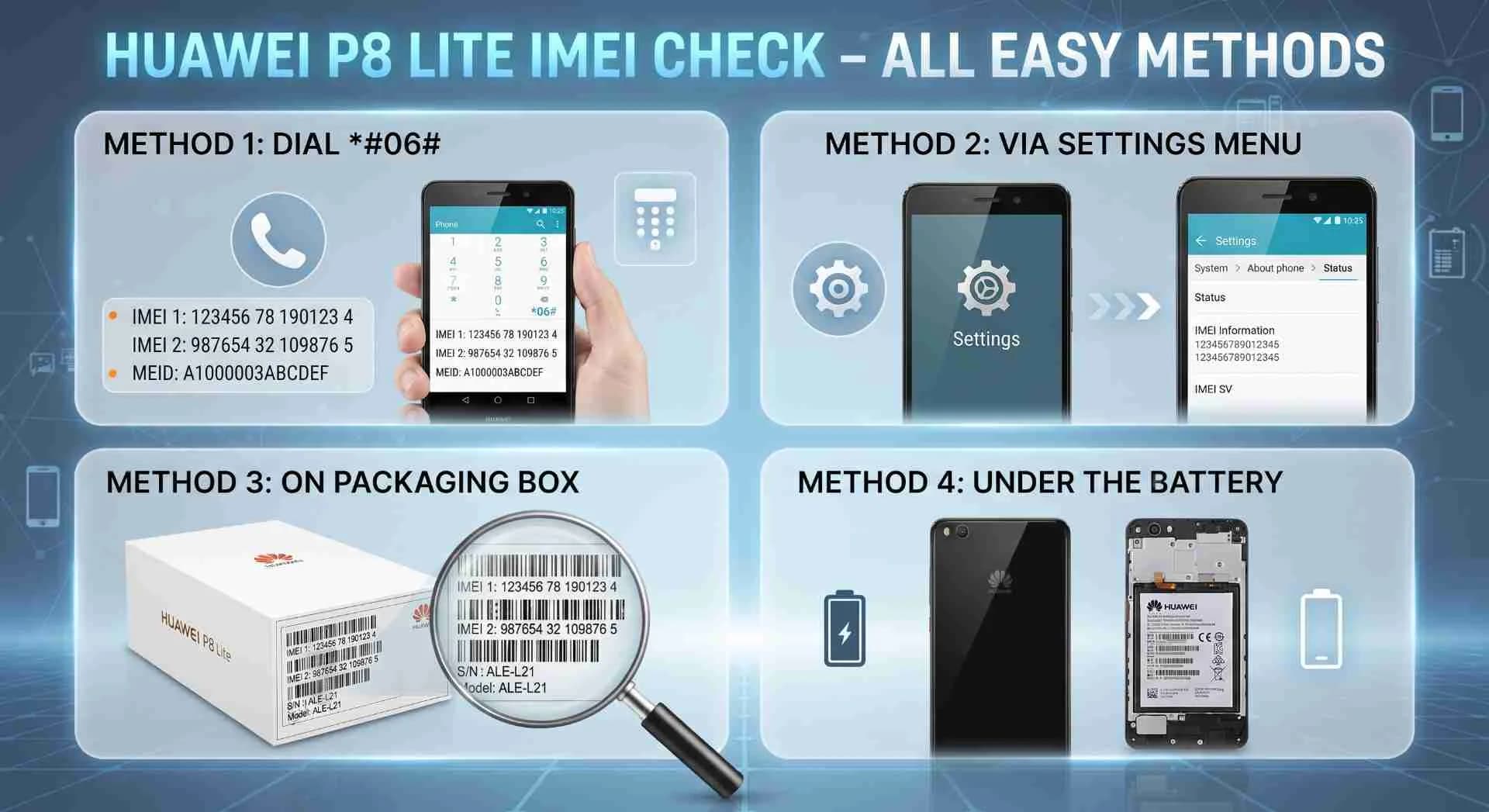
Method 1 – Check imei huawei p8 lite Using *#06#
The fastest way to find the imei huawei p8 lite is by using the built-in USSD code *#06#. This method works on almost every Huawei phone and doesn't require an internet connection, SIM card, or any third-party app.
From experience, this is the method technicians use first because it's quick, reliable, and available even if your phone has never been reset or updated.
Steps to Check the IMEI
Follow these simple steps:
Follow these simple steps:
Unlock your Huawei P8 Lite.
Open the Phone or Dialer app.
Dial *#06#.
Wait a second without pressing the Call button.
Your IMEI number will appear on the screen automatically.
If your Huawei P8 Lite supports Dual SIM, you'll usually see:
If your Huawei P8 Lite supports Dual SIM, you'll usually see:
IMEI 1 (SIM Slot 1)
IMEI 2 (SIM Slot 2)
Both numbers are valid and correspond to their respective SIM slots.
What Should You Do After Finding the IMEI?
Once the IMEI appears, don't close the screen immediately. Take a moment to verify that it matches the IMEI printed on the phone's retail box or SIM tray, if available.
This simple comparison can help you:
This simple comparison can help you:
Confirm the device is genuine.
Detect possible motherboard replacements.
Avoid purchasing a phone with mismatched hardware.
Keep a record for warranty or insurance purposes.
Many buyers on Quora have shared that checking the IMEI before paying for a second-hand phone helped them avoid devices that had been repaired with non-original parts.
If *#06# Doesn't Work
Although rare, the code may not display an IMEI. This can happen due to software issues or hardware faults.
Try these steps:
Try these steps:
Restart your Huawei P8 Lite.
Remove and reinsert the SIM card.
Update the phone if a software update is available.
Check the IMEI through the Settings menu.
Visit an authorized Huawei service center if the IMEI still doesn't appear.
Avoid downloading apps that claim to generate or change an IMEI. Besides being unreliable, they can create security and legal issues in many regions.
Quick Summary
Method | Internet Needed | Time Required | Difficulty |
|---|---|---|---|
Dial *#06# | No | Less than 10 seconds | Very Easy |
For most users, this is the quickest and most convenient way to check the Huawei P8 Lite IMEI before moving on to verification or PTA-related checks.
Method 2 – Find imei huawei p8 lite from Settings
If the *#06# code doesn't work or you simply prefer using the Settings app, Huawei provides another reliable way to find your device's IMEI. This method is especially useful if your dialer is unavailable or you're checking additional phone information at the same time.
I've found this method helpful when inspecting used phones because it also lets you verify the model number, Android version, and storage details alongside the IMEI.
Steps to Check IMEI from Settings
The exact menu may vary slightly depending on your EMUI version, but the process is generally the same.
Open the Settings app.
Scroll down and tap About Phone.
Select Status or Status Information.
Tap IMEI Information or IMEI.
Your IMEI number(s) will be displayed.
If your phone has two SIM slots, you'll see:
If your phone has two SIM slots, you'll see:
IMEI 1
IMEI 2
Each IMEI is linked to a separate SIM slot.
Works on Different Huawei Software Versions
This method is supported on the Huawei P8 Lite (2017) running:
This method is supported on the Huawei P8 Lite (2017) running:
Android 7.0 Nougat
Android 8.0 Oreo
EMUI 5
EMUI 8
EMUI 9
Even after software updates, the IMEI remains the same because it is stored in the phone's hardware, not in the operating system.
When Should You Use This Method?
Checking the IMEI from Settings is a good choice if you want to:
Checking the IMEI from Settings is a good choice if you want to:
Confirm the device model before buying.
Compare the IMEI with the retail box.
Record your IMEI for warranty purposes.
Verify the phone after a software update.
Troubleshoot network-related issues.
Many experienced buyers use both the *#06# method and the Settings method. If both show the same IMEI, it's a positive sign that the phone's software is reporting the correct device identity.
Compare the Information Carefully
Before leaving the Settings screen, compare these details with the phone and its packaging:
Item | Should Match? |
|---|---|
IMEI Number | Yes |
Model Number | Yes |
Storage Variant | Yes |
Android Version | May vary after updates |
Device Name | Yes |
If the IMEI shown in Settings doesn't match the number on the box or SIM tray, don't ignore it. It could indicate that the motherboard has been replaced or the device has undergone previous repairs. In such cases, ask the seller for an explanation before making a purchase.
Method 3 – Check imei huawei p8 lite on the Phone Box
If your Huawei P8 Lite won't turn on or you don't have immediate access to the Settings menu, the original retail box is another reliable place to find the IMEI. Huawei prints the device information on a barcode label attached to the packaging, making it easy to verify the phone before powering it on.
This method is particularly useful when buying a second-hand phone. A genuine seller should be able to provide the original box, and the IMEI printed on it should match the one stored in the device.
Where Is the IMEI Printed?
Look for the white sticker on the side or back of the retail box. It typically includes:
IMEI 1
IMEI 2 (for Dual SIM models)
Model number
Serial number (S/N)
Color
Storage capacity
Take a clear look at the barcode label and note the IMEI before comparing it with the phone.
How to Verify the IMEI
Once you have access to the phone, compare the IMEI on the box with the one displayed by dialing *#06# or through the Settings app.
Everything should match exactly.
Check these details:
Check these details:
IMEI on the box
IMEI shown on the phone
Model number
Storage variant
Color (if listed)
If all the information matches, it's a good indication that the phone and its packaging belong together.
What If the IMEI Doesn't Match?
A mismatch doesn't always mean the phone is fake, but it should never be ignored.
Possible reasons include:
Possible reasons include:
The motherboard was replaced during a repair.
The seller mixed up the phone and its original box.
The device was refurbished.
The phone has been modified or rebuilt.
If you're buying a used Huawei P8 Lite, ask the seller why the numbers are different. If they can't provide a reasonable explanation, it's safer to walk away from the deal.
Why Keeping the Original Box Matters
Keeping the original packaging offers several long-term benefits:
Keeping the original packaging offers several long-term benefits:
Makes resale easier.
Helps with warranty claims where applicable.
Simplifies IMEI verification.
Confirms the original model and storage variant.
Builds buyer confidence.
Many experienced buyers in Pakistan prefer phones that come with the original box because it adds another layer of trust during the purchase process.
Quick Comparison Checklist
Check | Expected Result |
|---|---|
IMEI on Box vs Phone | Must Match |
Model Number | Must Match |
Storage Capacity | Should Match |
Color | Should Match |
Serial Number | Should Match (if available) |
Taking a minute to compare these details can help you avoid buying a phone with an uncertain history or hidden hardware changes.
Method 4 – Check imei huawei p8 lite on the SIM Tray or Device Label
Not every Huawei P8 Lite owner knows this, but some variants include the IMEI on the SIM tray or on a label attached to the device. If your phone won't power on or you can't access the dialer or Settings, this can be a useful backup method.
From experience, technicians often check the SIM tray first when a phone has display issues because it doesn't require turning the device on.
Check the SIM Tray
Power off the phone before removing the SIM tray.
Use the SIM eject tool that came with the device or a compatible pin.
Carefully inspect the tray for:
Carefully inspect the tray for:
IMEI number
Model information (on some variants)
Keep in mind that not every Huawei P8 Lite model has the IMEI printed on the SIM tray. This depends on the production batch and regional variant.
Check the Device Label
Some Huawei P8 Lite units have a label on the back of the device or inside the SIM slot area containing:
Some Huawei P8 Lite units have a label on the back of the device or inside the SIM slot area containing:
IMEI
Serial Number (S/N)
Model Number
Manufacturing details
If the label is still intact, compare the IMEI with the number shown using *#06# or the Settings menu. All three should match.
Why Compare Every IMEI Source?
A genuine Huawei P8 Lite should display the same IMEI across all available sources.
Compare the following:
Compare the following:
IMEI from *#06#
IMEI from Settings
IMEI on the retail box
IMEI on the SIM tray or device label
If all numbers are identical, you can be more confident that the phone has not undergone major hardware changes.
What If the SIM Tray Has No IMEI?
Don't worry. This is normal for many Huawei P8 Lite models.
In that case, simply use one of these methods instead:
In that case, simply use one of these methods instead:
Dial *#06#
Check the Settings app
Look at the original retail box
These methods are sufficient for verifying your phone in most situations.
Best IMEI Sources Compared
IMEI Source | Reliability | Recommended |
|---|---|---|
*#06# Dial Code | Excellent | Yes |
Settings App | Excellent | Yes |
Original Phone Box | Very Good | Yes |
SIM Tray | Good (Model Dependent) | Yes |
Device Label | Good | Yes |
The more sources you compare, the easier it becomes to identify inconsistencies before buying or repairing a Huawei P8 Lite. Spending a few extra minutes on this check can save you from costly problems later.
How to Verify imei huawei p8 lite in Pakistan
Finding the IMEI is only half the process. The next step is verifying it, especially if you're buying a used Huawei P8 Lite in Pakistan. An IMEI verification helps confirm that the phone is genuine, hasn't been reported as lost or stolen, and can work properly on local mobile networks.
Many buyers focus on the phone's appearance, battery health, or camera quality. However, experienced users know that a few minutes spent verifying the IMEI can prevent bigger problems later.
Why IMEI Verification Matters
Verifying your IMEI gives you peace of mind before using or purchasing the device.
It helps you:
It helps you:
Confirm the phone is genuine.
Check PTA approval status.
Avoid purchasing a blacklisted device.
Verify the IMEI matches the hardware.
Reduce the risk of buying a refurbished phone sold as new.
Support future resale by proving authenticity.
In Pakistan's second-hand market, phones often change hands several times. Verifying the IMEI helps ensure you're not inheriting someone else's problem.
What Should You Check?
Before completing a purchase, compare the IMEI across multiple sources.
Use this checklist:
Use this checklist:
Dial *#06# and note the IMEI.
Check the IMEI in the Settings menu.
Compare it with the original retail box.
Inspect the SIM tray or device label if available.
Verify the phone's PTA status through official channels.
If every detail matches, it's a strong indication that the device is authentic and hasn't undergone major hardware replacement.
Warning Signs to Watch For
While verifying the IMEI, be cautious if you notice any of the following:
The IMEI displayed on the phone doesn't match the box.
One SIM slot has no IMEI while the other does.
The seller refuses to let you check the IMEI.
The phone shows an invalid or null IMEI.
PTA status cannot be confirmed.
These issues don't always mean the phone is fake, but they deserve further investigation before you make a payment.
Verification Tips for Second-Hand Buyers
If you're buying from an online marketplace or a local mobile shop, follow these practical tips:
Meet the seller in a public place.
Test both SIM slots if it's a Dual SIM model.
Compare all available IMEI sources.
Ask for the original purchase receipt if available.
Keep a screenshot or photo of the IMEI for your records.
One common mistake people make is trusting screenshots sent by the seller before meeting in person. Always perform the IMEI verification yourself while holding the device.
Quick Verification Checklist
Verification Step | Recommended |
|---|---|
Check IMEI using *#06# | ✔ Yes |
Compare with Settings | ✔ Yes |
Match with Retail Box | ✔ Yes |
Check SIM Tray or Label | ✔ If Available |
Verify PTA Status | ✔ Strongly Recommended |
Test Both SIM Slots | ✔ For Dual SIM Models |
Taking these precautions requires only a few minutes but can save you from purchasing a device with network restrictions, hardware replacements, or ownership issues.
What to Do If the imei huawei p8 lite Is Missing or Invalid
A missing or invalid IMEI can prevent your Huawei P8 Lite from connecting to mobile networks. You may notice messages such as "Invalid IMEI," "Unknown Baseband," or "No Service." While these issues can seem alarming, they don't always mean the phone is permanently damaged.
From experience, most IMEI problems appear after an unsuccessful software installation, hardware repair, or motherboard replacement rather than during normal daily use.
Common Reasons an IMEI Becomes Missing
There are several possible causes behind an invalid or missing IMEI.
The most common ones include:
The most common ones include:
Corrupted system software
Failed firmware update
Motherboard replacement
Hardware damage after a fall or water exposure
Unauthorized flashing or rooting
Baseband software corruption
If the phone was purchased second hand, it's also possible that previous repairs affected the device's identification information.
Signs Your Huawei P8 Lite Has an IMEI Problem
Watch for these symptoms:
Watch for these symptoms:
*#06# displays nothing.
The phone shows "Invalid IMEI."
Mobile network isn't detected.
Calls and SMS don't work.
Mobile data remains unavailable.
Baseband version appears as "Unknown."
If you experience several of these issues together, the IMEI or modem software may require professional inspection.
Can You Repair the IMEI?
Many users search for terms like "Imei huawei p8 lite repair" when facing network issues. In reality, the solution depends on the underlying cause.
If the issue is software-related, an authorized Huawei technician may be able to restore normal functionality using official service procedures.
If the motherboard is physically damaged, additional hardware repairs may be necessary.
Avoid websites or videos promising one-click IMEI repair tools. Besides being unreliable, unofficial methods can damage the phone further or violate local regulations.
What About IMEI Unlock or Reset?
Searches such as "Imei huawei p8 lite unlock" and "Imei huawei p8 lite reset" are common, but they often create confusion.
Here's what you should know:
Here's what you should know:
A factory reset does not change or restore the IMEI.
Unlocking the bootloader does not generate a new IMEI.
The IMEI is tied to the device's hardware, not your user data.
Only legitimate service procedures should be used to resolve IMEI-related faults.
A Note on Changing the IMEI
You may come across searches such as:
You may come across searches such as:
cambiar imei huawei p8 lite
cambiar imei modo ingeniero huawei p8 lite
cambio de imei huawei p8 lite
como cambiar el imei de huawei p8 lite
These phrases are popular because many users are looking for solutions after software or network problems. However, changing or altering a phone's IMEI may be restricted or illegal depending on your country's laws. If your Huawei P8 Lite has an IMEI issue, the safest approach is to seek assistance from an authorized Huawei service center or a qualified repair technician.
Safe Troubleshooting Checklist
Problem | Safe Action |
|---|---|
IMEI Not Showing | Restart the phone and check *#06# again |
Invalid IMEI | Visit an authorized Huawei service center |
No Mobile Network | Check the SIM card and network settings |
Unknown Baseband | Have the device inspected by a professional |
IMEI Doesn't Match the Box | Verify the phone's repair history before purchasing |
Understanding the cause of an IMEI problem is far more important than searching for quick fixes. In most cases, professional diagnosis is the safest way to restore normal network functionality without risking further damage.
Huawei P8 Lite IMEI Check Tips
After helping many people verify used smartphones, one thing becomes clear: spending five minutes checking the IMEI can save you from weeks of frustration. Whether you're buying, selling, or simply verifying your own device, following a few best practices makes the process much safer.
Many buyers get excited when they find a Huawei P8 Lite at a low price. However, a lower price should never be a reason to skip an IMEI check. A genuine device with matching details is usually a better investment than a cheaper phone with an uncertain history.
Best Practices Before Buying a Used Huawei P8 Lite
Use this checklist before making payment:
Use this checklist before making payment:
Compare the IMEI using *#06# and the Settings menu.
Match the IMEI with the original retail box.
Verify the model number.
Test both SIM slots.
Check the fingerprint sensor.
Confirm the cameras work properly.
Test Wi-Fi, Bluetooth, and GPS.
Inspect the charging port and speakers.
Ask if the phone has ever been repaired.
Keep a photo of the IMEI for future reference.
These simple checks reduce the chances of buying a device with hidden issues.
Pros and Cons of Checking the IMEI
Pros | Cons |
|---|---|
Confirms the phone is genuine | Takes a few extra minutes |
Helps verify PTA compatibility | Original box may not always be available |
Detects mismatched hardware | Some older devices may have worn labels |
Makes resale easier | Not every SIM tray includes the IMEI |
Supports warranty and ownership verification | Requires careful comparison across sources |
The benefits clearly outweigh the small amount of time required.
IMEI Verification Methods Comparison
Method | Speed | Accuracy | Internet Required | Best For |
|---|---|---|---|---|
*#06# Dial Code | Excellent | Excellent | No | Everyday users |
Settings Menu | Excellent | Excellent | No | Software verification |
Phone Box | Good | Very Good | No | Used phone buyers |
SIM Tray or Device Label | Good | Good | No | Hardware inspection |
For the best results, compare at least two different sources instead of relying on just one.
Huawei P8 Lite vs Other Huawei Models for IMEI Checking
Although the IMEI checking process is similar across Huawei phones, there are small differences worth knowing.
Feature | Huawei P8 Lite (2017) | Huawei P9 Lite | Huawei Nova Lite |
|---|---|---|---|
Dial *#06# Support | ✔ | ✔ | ✔ |
Settings IMEI | ✔ | ✔ | ✔ |
Dual SIM IMEI | Yes | Yes | Yes |
SIM Tray IMEI | Model dependent | Model dependent | Model dependent |
PTA Verification | Recommended | Recommended | Recommended |
Regardless of the model, verifying the IMEI before purchasing a used phone is always a smart decision.
Real Customer Experiences
Many Huawei users share similar stories online after buying second-hand phones.
Case 1: The Careful Buyer
A buyer compared the IMEI on the phone with the retail box before making payment. The numbers matched, and the device worked perfectly without any network issues.
Case 2: The Missed Warning
Another buyer purchased a Huawei P8 Lite based only on its appearance. Later, they discovered the IMEI on the phone didn't match the box, and the device had previously undergone motherboard replacement.
Case 3: The Smart Seller
One seller included clear photos of the IMEI, retail box, and model number in the listing. Buyers trusted the listing more, and the phone sold quickly because everything was transparent.
These real-world situations show why a simple IMEI check should never be skipped.
Final Thoughts
Checking the imei huawei p8 lite is one of the simplest yet most valuable steps you can take before using or purchasing this smartphone. It takes only a few seconds, but it can help you confirm the phone's authenticity, verify its identity, and avoid potential network or ownership issues.
Throughout this guide, we've covered multiple ways to find the IMEI, including the dial code, Settings menu, retail box, and SIM tray. We also explained how to verify the IMEI in Pakistan, what to do if it's missing or invalid, and the safest practices to follow when buying a second-hand Huawei P8 Lite.
If you came across searches such as "Imei huawei p8 lite repair," "Imei huawei p8 lite unlock," or "Imei huawei p8 lite reset," remember that most IMEI-related problems should be handled through legitimate repair channels rather than unofficial software or online tools. Protecting your device's original identity is always the safest approach.
Whether you're a first-time buyer or someone who has owned Huawei phones for years, developing the habit of checking the IMEI can save time, money, and unnecessary stress in the future.
Protect Your Huawei P8 Lite Before It's Too Late
Many people only think about their phone's IMEI after they experience a network problem or discover an issue with a used device. By then, resolving the problem can become more difficult and expensive.
Instead, make IMEI verification part of your regular smartphone checklist.
Before you buy or sell a Huawei P8 Lite:
Before you buy or sell a Huawei P8 Lite:
Check the IMEI using *#06#.
Compare it with the Settings menu.
Match it with the original retail box.
Verify the phone through official PTA-supported channels.
Keep a copy of your IMEI for future reference.
These simple steps take just a few minutes but can prevent costly mistakes.
If you found this guide helpful, explore more Huawei smartphone guides, Android tips, and practical buying advice on PehlePakistan.pk. Staying informed is the easiest way to make smarter mobile decisions.
Frequently Asked Questions
How Much Does the Huawei P8 Lite (2017) Cost?
The Huawei P8 Lite (2017) is no longer sold as a new device in most markets. It is mainly available as a used or refurbished phone. Prices usually range from around $25 to $90, depending on the phone's condition, storage variant, and included accessories.
How Do I Update the Huawei P8 Lite (2017)?
Open Settings > System & Updates > Software Update. If a new update is available, you can download and install it manually or enable automatic overnight updates. The phone officially supports upgrades from Android 7.0 Nougat to Android 8.0 Oreo with EMUI updates.
Does the Huawei P8 Lite (2017) Support 4G?
Yes. The Huawei P8 Lite (2017) supports 4G LTE connectivity. It is compatible with 4G mobile networks and delivers faster browsing, streaming, and downloads when used with a supported SIM card and carrier.
Is the Huawei P8 Lite (2017) Still Worth Buying?
For users looking for an affordable smartphone for everyday tasks, the Huawei P8 Lite (2017) remains a decent option. It offers a Full HD display, reliable performance, a fingerprint sensor, and a solid camera, making it suitable for basic daily use.
Is the Huawei P8 Lite (2017) Waterproof?
No. The Huawei P8 Lite (2017) does not have an official IP water-resistance rating. It should be kept away from water, rain, and excessive moisture to avoid damage to its internal components.
What Are the Most Common Huawei P8 Lite (2017) Problems?
Some users have reported issues such as Wi-Fi or Bluetooth connection problems, touchscreen responsiveness, front camera glitches, battery wear, and the phone not powering on. Most software-related issues can often be resolved through updates or troubleshooting.
Does Huawei Still Provide Android Updates for the Huawei P8 Lite?
The Huawei P8 Lite (2017) officially received Android 8.0 Oreo as its final major Android update. While newer Android versions are not available, Huawei may still provide limited security or app updates where supported.
Published for PehlePakistan.pk
Article Details
Category: Pakistan
Published:
Updated:
Author: Urooj
More Stories